React Navigation Plugin

The React Navigation plugin provides comprehensive navigation debugging and inspection for React Navigation v7, offering real-time action monitoring, state inspection, and deep linking testing directly within your React Native DevTools environment.
What is React Navigation Plugin?
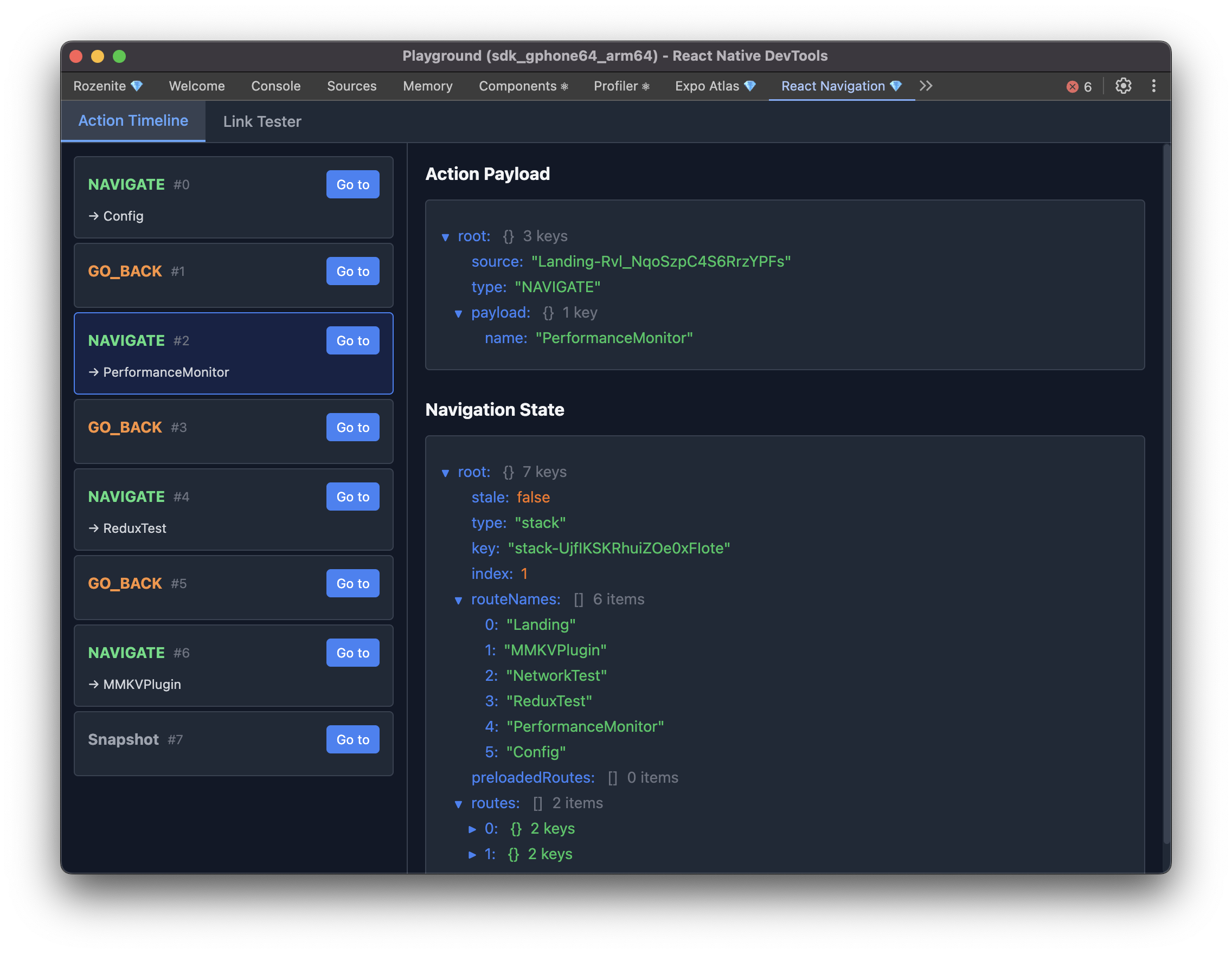
The React Navigation plugin is a powerful debugging tool that helps you inspect and debug navigation in your React Native application. It provides:
- Action Timeline: Track all navigation actions in real-time with detailed history
- Dispatch Origin: See the source-mapped file and line where each action was dispatched from, with the full call stack
- State Inspection: View and analyze navigation state at any point in time
- Time Travel Debugging: Jump back to any previous navigation state
- Deep Link Testing: Test and validate deep links directly from DevTools
- State Reset: Reset navigation state to any previous point in the timeline
- Real-time Updates: See navigation changes as they happen in your app
Installation
Make sure to go through the Getting Started guide before installing the plugin.
Install the React Navigation plugin as a development dependency:
Add the DevTools hook to your React Native app to enable navigation debugging:
With react-navigation
With expo-router
Web (React Native for Web)
With Rozenite for Web, this plugin is available when you debug your React Native web app.
Usage
Once configured, the React Navigation plugin will automatically appear in your React Native DevTools sidebar as "React Navigation". Click on it to access two main features:
Dispatch Origin
Every captured action is annotated with where it was dispatched from. The detail panel shows a Dispatch Origin section above the action payload:
- A headline summarising the dispatch call site, for example
Dispatched from handlePress in apps/playground/src/screens/Home.tsx:42. Alow confidencechip appears when the chosen frame is insidenode_modules/. - The Metro code-frame snippet for the call site when available.
- A collapsible full stack — application frames are bright, library frames (
node_modules/*) are muted and tagged. - A Copy raw button copies the unmodified stack string as React Navigation provided it.
The sidebar's action list shows a compact preview (↳ Home.tsx:42) so you can spot the source without opening each action. Symbolication runs against the Metro development server, so origins are only resolvable in development builds; release builds show "symbolication unavailable" and the raw stack remains accessible.
Agent Integration
This plugin also exposes Agent tools under the @rozenite/react-navigation-plugin domain for LLM workflows.
navigate(high-level)go-back(high-level)get-root-stateget-focused-routelist-actionsreset-root(low-level)open-linkdispatch-action(low-level)
Use navigate and go-back first for routine movement across stacks/tabs. Use dispatch-action and reset-root only when high-level tools are insufficient.
These tools allow read access to the current navigation state and recent action timeline (rolling in-memory history), plus mutation actions for navigation control and deep linking.
Entries returned by list-actions include an origin payload (when React Navigation supplied a stack) with the source-mapped frames, the chosen origin frame, a confidence level, and the symbolication status. Agents should read origin.originFrame after confirming origin.symbolicationStatus === 'complete'.
Contributing
The React Navigation plugin is open source and welcomes contributions! Check out the Plugin Development Guide to learn how to contribute or create your own plugins.
Support
If you encounter issues with the React Navigation plugin:
- Check Documentation: Review this guide for common solutions
- Verify Setup: Ensure React Navigation v7 is properly installed and configured
- Check Ref: Verify that you're passing the NavigationContainer ref correctly
- Search Issues: Look for similar issues in the repository
- Create Issue: Report bugs or request features
- Community: Reach out to the Rozenite community for help
Next: Learn about Plugin Development to create your own plugins, or explore other Official Plugins.