Network Activity Plugin
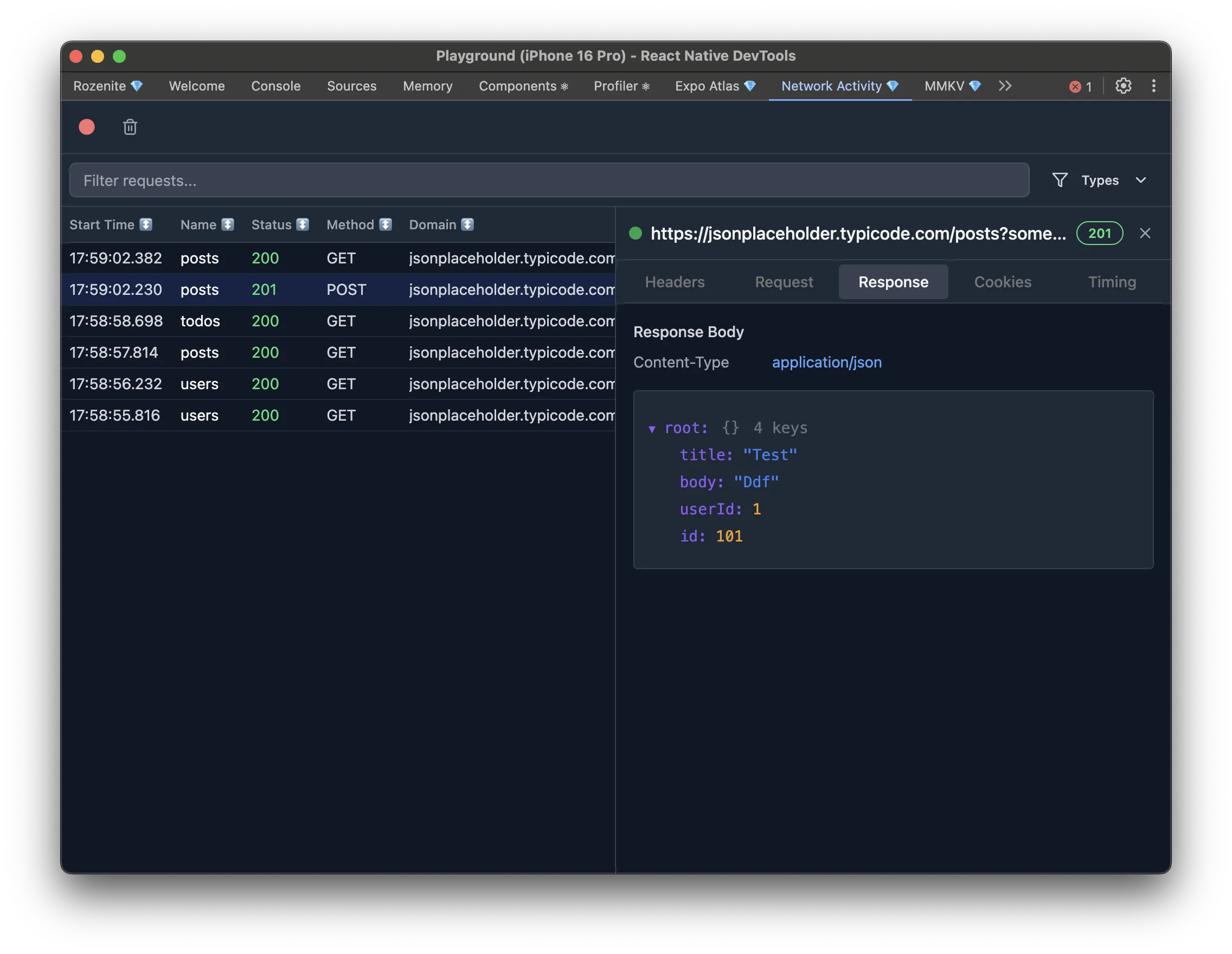
The Network Activity plugin brings a Chrome-DevTools-style network inspector into React Native DevTools: every HTTP/HTTPS request, WebSocket connection, and Server-Sent Event your app makes, in real time.
Installation
Section titled “Installation”Make sure to go through the Getting Started guide before installing the plugin.
npm install -D @rozenite/network-activity-pluginyarn add -D @rozenite/network-activity-pluginpnpm add -D @rozenite/network-activity-pluginbun add -D @rozenite/network-activity-pluginimport { useNetworkActivityDevTools } from '@rozenite/network-activity-plugin';
function App() { useNetworkActivityDevTools();
return <YourApp />;}To also capture requests made before your app finishes initializing, add this to your entry point:
import { withOnBootNetworkActivityRecording } from '@rozenite/network-activity-plugin';
withOnBootNetworkActivityRecording();
If your app uses nitro networking, install it too, and its HTTP and WebSocket traffic merges into the same panel automatically:
npm install react-native-nitro-fetchOnce configured, “Network Activity” appears in your React Native DevTools sidebar. The request list shows method, status, timing, and a Built-in / Nitro badge for where each request came from. Click any request for full details: headers, query parameters, and request/response bodies.
Viewing responses
Section titled “Viewing responses”The response body view adapts to the content type, with a Preview / Raw toggle when both are useful:
- Images and SVGs render inline; other binary formats (PDF, zip, audio, video, fonts) show a byte-level view instead, since there’s nothing to preview.
- JSON and XML render as a collapsible, copyable tree, with the raw body pretty-printed in the Raw tab.
- HTML renders in a sandboxed preview that can’t make outbound requests, with the source available in Raw.
- Text formats (plain text, CSS, JS) render as monospace text.
- Every binary response has a Download button; very large or empty responses show a placeholder instead of a preview.
Configuration
Section titled “Configuration”By default all traffic types are monitored. Disable ones you don’t need — useful when a type is noisy or expensive to capture:
useNetworkActivityDevTools({ inspectors: { http: true, websocket: false, sse: false, // requires http to be enabled },});Next: Learn about Plugin Development, or explore other Official Plugins.